Menu
Home Contact Gallery Sitemap News Resources
Gliding Goodies
Mikrosmart Microphones Microair Radios ClearNav Flight Computers KS Avionics X-Com Tranceivers Glider Avionics FAQs Squealing Microphones Wingstands


Motorized Bergfalke Mk1
McPhee Aviation

ClearNav Flight Computer

Overview
Nielsen Kellerman is developing the next generation of soaring instruments.  Their first product is the soon to be released ClearNav flight computer running ClearNavigator soaring flight software by Chip Garner.

Status of the ClearNav
About 15 units have been sent to dealers and other key people around the world.  The display itself is more or less complete and it looks great.  Still remaining to be completed are the connectors on the back of the unit, the remote pitot and static input model and the remote control unit. 

Beta Testers Wanted
I will receive 3 beta units soon to sell at a discounted price to customers that are willing to help with testing and debugging the software and hardware.  Software upgrades will be easy to do using the USB memory stick.  The system will be upgraded over time to the final configuration.  I don't know whether or not it will be necessary to send the hardware back to the factory for upgrades.  I don't think that will be necessary, but I can't be certain.  Please let me know if you are interested in buying a beta unit.  I have started a waiting list.

First Impressions
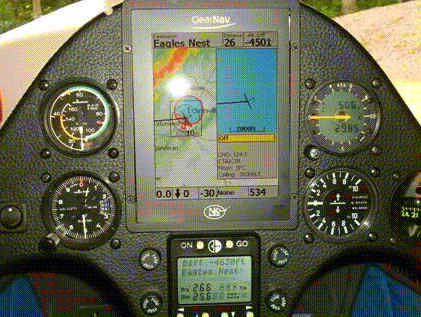
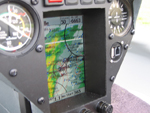
Finally I have received my first ClearNav unit and can honestly say that I am extremely impressed with the hardware and software.  The display has a large and extremely bright screen without the overall dimensions being too large.  I didn't think I was going to like the lack of a touch-screen, but I find the remote to be easy to use and the software very intuitive - I would say if you can use your NextG mobile you cane use this.  I am not great on new technology even though I have a Science degree major in Mathematics!!  The 2 software features that impress me the most are the way area tasks are supported, and the "Glide Amoeba" glide range rings. 

Clear Navigator Software

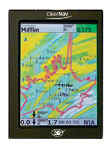
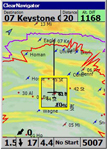
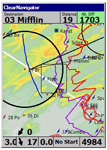
Quick Overview of the Innovative Features Displayed on the Moving Map
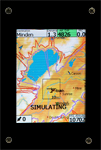
(Screen captures from the PC simulator)

    * The purple arc is the "Glide Amoeba" to a user specified arrival altitude over the terrain
      You can make it to the purple arc and still have enough altitude for a safe pattern and landing. 
      The arrival altitude is user adjustable (1000 feet AGL in these examples).
      The left example is over flat terrain. Note how the rings are shifted to compensate for the wind. 
      The right example is in mountainous terrain with a ridge in the lower right quadrant of the screen.
    * The red arc is the"Glide Amoeba" to ground level.
    * The black circles are turn areas
    * The heavy black line is line from your current position to the active waypoint. 
      Simply turn the glider until the line is pointed straight up an you will be on course.
    * The fine black lines show the task course line.  They are drawn automatically.
    * The blue arc in the turn area is a locus of points of equal task distance.  Simply fly to any
      point on the blue arc and you will complete the task in the desired task time.  The blue
      arc moves out and back if you change the estimated speed around the course.  There is
      no need to move turn points within the turn area. 
 

The Team

The team of people working on the product is very impressive. It includes:

    * Richard Kellerman - Soaring Pilot (recent Hilton Cup Winner), businessman
    * Dave Ellis - Soaring Pilot, Ran Cambridge Aero Instruments for 14 years, Driving force behind the Cambridge C-NAV, M-NAV, L-NAV, S-NAV, and the first IGC Approved Flight Recorder - the GPS-NAV. He also developed the Cambridge 302 and 303. I am bias but in my opinion the Cambridge products were industry leaders in regard to ease-of-use. Dave And I are “mates” for 20+ years and we always chat on skype. 
    * Chip Garner - World level soaring competition pilot, Software Engineer, developer of Glide Navigator and Glide Navigator II (originally Cambridge Pocket-NAV) soaring flight software. Big proponent of the "keep the instruments simple - keep your eyes out of the cockpit" instrument design philosophy.
    * Phil Schlosser - Worked with Dave Ellis at Cambridge Aero Instruments for 14 years or so. Firmware developer for the Cambridge 302 and many other products. He was the brains behind Cambridge (sorry Dave) and I call a personal friend.
    * Rick Sheppe - Soaring Pilot, functional designer of the Cambridge S-NAV, L-NAV and GPS-NAV. Rick is also a personal friend

ClearNav Overview
I really have not got into PDA's - my excuse being I had trouble reading same and I consider myself pretty good at mental arithmetic and could do those calculations when to arrive home.  Also a bit like Lairdy (Mark Laird) I just and just fly with a simple 303. I have changed my ways with ClearNav and am now a fan of graphical moving map displays because they present key information to the glider pilot in a clear way so that one can glance at the display and get a quick overview of how you are doing. You know instantly which airports are within gliding range. That is powerful information and dramatically enhances safety. The problem is that currently available PDAs have small screens that are quite difficult to read in sunlight - they just are not bright enough. NK has designed what I consider to be a fantastic solution. It is a large display that really is easy to read in sunlight.

Key Features

    * Large, extremely bright 5.5+" diagonal color LCD screen (the largest PDAs are 4" diagonal).
    * The display is not a touchscreen - to maximize screen brightness
    * Built-in GPS
    * IGC Approved Flight Recorder (Coming Soon)
    * Pitot and Static inputs for measuring airspeed to enhance wind speed and direction calculations. - Even better than the high quality sensors used in the Cambridge 302.
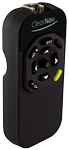
    * Remote Keypad -much like most mobile phones- Simple operator interface for operating the screen
    * Moving map with selectable layers
    * Comprehensive task optimization
    * Glide "amoeba" (gliding range footprint) shows areas you can reach, taking wind, glider polar, and terrain into account
    * New Method for Area Tasks - A blue arc shows where to turn in the turn area.
    * Airmass history
    * Airspace Monitor
    * Landability status monitor
    * Specifications
    * Size: 4.3"w x 5.8"h x 1.1"d (109mm x 147mm x 27mm)
    * Display Size: ~3.5"w x 4.6"h (88mm x 117mm)
    * Screen Resolution: 240 x 320 pixels
    * Weight: ~1 lb (450 g)
    * Operating System: Windows CE.NET
    * Memory: 2 GB of internal memory for turnpoint, terrain, map and airspace information
    * Data Transfer: USB Flash Drive and perhaps a built-in SD card reader
    * Power Requirements: 9 to 16 VDC
    * Power Consumption: ~700 mA (at 12V)

Interesting Details
I was very intrigued when I learned that the ClearNav will have a built-in GPS and IGC Approved flight recorder. That eliminates the need to connect it to an external GPS - which makes installation much easier. I imagine it will take a year to get the IGC approval as per usual.

Area Task Support - Brilliant!
When I first started playing with my ClearNav demo I was extremely impressed with the brilliant new way the ClearNav handles area tasks.  Competitive software requires that you move the turn point within the turn area.  That can be cumbersome and even dangerous to do in flight.  The ClearNav is much simpler and more intuitive.  There is no need to move or manipulate the turn location in any way.  A blue arc is show inside the turn area.  It is a locus of points within the turn area that lie along an ellipse such that making your turn at any point on the line will give you the same distance around the course.  The software places the blue arc automatically based on your estimated speed around the course and the task time.  Task course lines are drawn in fine black lines from the start point, to a point on the blue line and then on to the center of the next turn area.  If you are flying fast then blue arc moves to a point on the far edge of the turn area.  If you are flying slowly the blue arc moves to a point on the near side of the turn area.  When the blue arc reaches the far or near side of the area then the turnpoint in the next turn area moves away from the center of that area to compensate.  For example, if you are flying slowly then the blue arc will move to the near side of the turn area you are headed for and the turn point in the following turn area will move closer to the near edge of that area.  I think this way of handling turn areas is revolutionary and brilliant!  Congratulations Chip Garner on this innovation!  It is brilliant because you never need to move the turn point manually, you just glance at the screen and fly to a point on the blue arc.  That makes flying safer because you will keep your eyes out of the cockpit and it also makes you faster because you can focus your efforts on flying fast - not fiddling with the software.

Glide Amoebas
The glide amoebas show your gliding range graphically on the map.  They take into account the wind, glider polar, altitude and surrounding terrain.  Over flat terrain they look like circular rings.  Over mountainous terrain they look like, well... amoebas. A ridge shows up as a flat "impassable" line while long extended "fingers" show where it is possible to glide through mountain passes or down into valleys. In flat land soaring the footprint will be much more circular or ellipse shaped. This is a very powerful feature.  Past generations of soaring software highlighted reachable airports on the map - which is also nice, but in ClearNavigator you can see at a glance not just what airports are reachable (any airport inside the glide amoeba) but you also know how far you can glide over the ground - or down into a valley.  To me the most powerful feature of any soaring software is the ability to glance at the screen and know instantly whether or not you can make it to a nearby landing site. The Glide Amoebas makes that very clear and intuitive and easy to use in flight - Fantastic!

    * The purple arc is the "Glide Amoeba" to a user specified arrival altitude over the terrain You can make it to the purple arc and still have enough altitude for a safe pattern and landing.  The arrival altitude is user adjustable (1000 feet AGL in these examples). The left example is over flat terrain. Note how the rings are shifted to compensate for the wind.  The right example is in mountainous terrain with a ridge in the lower right quadrant of the screen.

     * The red arc is the "Glide Amoeba" to ground level.

Pitot and Static Inputs
Another very interesting feature is the built-in pitot and static inputs for measuring airspeed. That will allow the unit to calculate wind speed and direction not only when thermalling, but also when cruising. I have been told that the software will not use the inputs to calculate speed-to-fly or variometer functions. It would seem to me that those features would be possible in the long run, but they may be avoiding it in order to keep the operator interface as simple and clean as possible - just speculation. Adding push-pull arrows and a vario needle could make the screen a bit cluttered.
 

Remote Control
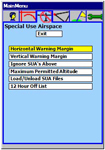
A small remote control is used to control the software.  It includes Arrow Keys (Left, Right, Up, Down), Enter, Zoom In, Zoom Out, Focus, and Ribbon (menu) buttons.  The operation of the buttons is quite intuitive.  The Focus button changes the focus of the software between the user selectable data shown on the bottom of the screen and a black rectangle in on the moving map.  The black rectangle can be used to pan the map to view regions outside the current view, or to select items inside the rectangle.  For example, you can use the Arrow Keys to move the rectangle over airports or airspace on the map. Then press the enter key and you can view airport or airspace data or make an airport in the rectangle the active waypoint so you can fly directly to it.  The Ribbon key is used to display and hide the pop-up menu icons.  They are shown and described below. They appear near the top of the screen.
Ribbon Icons (from left to right)

    * Change active waypoint (sorted by distance from current location or by name)

    * Bugs (polar degradation)

    * Water Ballast

    * Map Orientation (North Up or Track Up)

    * Screen Brightness
 
    * Task Edit

    * Map Settings

    * Simulator Settings (speed, turn rate, altitude)

    * Settings Menu

    * Ribbon Options
 

Waypoint and Airspace File Compatibility
The ClearNav comes loaded with maps and elevation data for the entire world.  It supports waypoint files in either the Cambridge (Glide Navigator II) ".dat" format or the SeeYou ".cup" format.  It supports airspace files in the Tim Newport-Peace ".sua" format.  Soaring site data is readily available on the internet at the Worldwide Soaring Turnpoint Exchange.  You can use SeeYou or StrePla to import the latest airport data  and then export a subset of local airports to a Cambridge or SeeYou waypoint file.

What Vario to Use with It?
In the long run NK has plans to manufacture a complete line of soaring instruments, but I don't expect any other new products until 2009 at the earliest or will we see a joining of Cambridge and NK which I think may happen sooner than later. Many potential customers have asked me what vario would be the best option for use with the ClearNav. That is tough to say at this point as it is unclear what functions will be supported by the ClearNav in the long run. At the very least most pilots will want a good speed-to-fly variometer. Many will probably use a Cambridge 302 because it offers many features in a small box. The IGC Approved flight recorder in the 302 will be redundant in the long run, but who knows how long it will take NK to get IGC Approval for the ClearNav - it could take a year. If so, then certainly now a 302 is a great companion product and I could only recommend it.  I do believe that eventually there may be an amalgamation  Once the ClearNav has IGC approval then the 302 would be a great back-up logger. Other units worth considering include the LX1600 and Borgelt B500. If you don't need a speed-to-fly vario then a Tasman V1000, Borgelt B400 or LX16 would work fine.

Price
The estimated market price is $US2500 more detail will be available on this very soon. I think it is a great value at that price. There are many glider pilots that are dying to replace their iPAQs with a larger and easier to read (brighter) display.

My Impressions
As I said above, I am very impressed with the product. Naturally I am a big fan of Dave Ellis for 20+ years and his "keep it simple. and the unit seems to keep to that principle well. I love the Glide Amoebas and the Area Task support.  I like that the screen is not overly cluttered and it is easy to hide the terrain data if you want to see only airports, airspace and "culture" data such as rivers, lakes, cities and roads.  The fonts are large and easy to read.

The unit is not touch screen   I gather touch screen is a compromise as maximum screen brightness is a higher priority. Touch-screens consist of plastic layers placed between the LCD screen and the operator and they reduce the amount of light that gets to the pilot's eyes. Another reason to do without the touch-screen is that touch-screens are not ideal for use in a glider cockpit - while bumping along in ridge lift. A handheld or stick mounted keypad is a much better option for use in a glider. I am not a fan of having to reach up and touch even the side of the screen.  The only way to set up a Microair radio is to touch a remote button and not be touching that radio - the Xcom is better.  I am confident that the keypad solution will be an easy-to-use and intuitive alternative to a touch-screen. Borgelt has used it!! A nice side-benefit to the use of a keypad rather than a touch-screen is that there is no need to mount the screen in a location where it is reachable. Often PDAs are mounted on gooseneck or RAM arms to get them closer to the pilot - within reach. That is not necessary with the ClearNav - just mount the keypad within reach.

I was also surprised to learn that the screen resolution is only 1/4 VGA (240 x 320 pixels). Most PDAs use that resolution, so it is not a problem (it is what most soaring pilots are used to), but I have become used to the 480 x 640 resolution on my iPAQ hx4700 Pocket PC. It can be argued that the higher resolution is not an advantage because you don't want to display small text on the screen anyway - you wouldn't be able to read it while bumping along in a glider. I'm sure that is true, but the higher resolution of the hx4700 does make even large text slightly sharper and easier to read. Again, the modest resolution of the ClearNav was necessary to enable maximum screen brightness - which I must agree is a reasonable compromise.

I agree completely that PDAs are not easy to read in sunlight even 4700 which is one of the better ones. The ClearNav is much better solution for use in a glider.My concern is there is no FLARM info but I have been assured this will come real soon.  Klaus Keim has insisted this as a requirement for Germany and I say the same for Australia.  Those Yanks seem to be behind on this one!!

Mounting Options
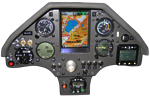
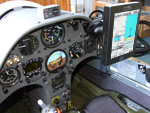
Several mounting options will be available for the ClearNav. It can be mounted to the front (pilot) side of the instrument panel, recessed into the front of the instrument panel, or mounted on an articulated RAM arm that is attached to the instrument panel.

Conclusions
This is going to be an extremely popular flight computer system.

- Details on the NK web site

How to order or show interest just contact me by phone or email

The ClearNav is a large, bright, color, navigation display that runs ClearNavigator soaring flight software.

Included

    * ClearNav moving map display unit
    * Remote Control
    * Remote Pitot and Static connection
    * RAM mounting arm (2 lengths)
    * USB Flash Drive (for upgrading the software and transferring waypoint and airspace files and flight logs)

Beta Testers Wanted
I will receive a few units soon to sell at a discounted price to customers that are willing to help with testing and debugging the software and hardware.  This would normally go to oldtime Cambridge customers who are holding out for the ClearNav.  Software upgrades will be easy to do using the USB memory stick.  The system will be upgraded over time to the final configuration.  I don't know whether or not it will be necessary to send the hardware back to the factory for upgrades.  I don't think that will be necessary, but I can't be certain.  Please let me know if you are interested in buying a beta unit.  I have started a waiting list.

So there you have it

Ian McPhee

http://www.nkhome.com/soaring/soaringindex.html